
16-M-001-3.0
Disclaimer Regarding Use of SWGDE Documents
SWGDE documents are developed by a consensus process that involves the best efforts of relevant subject matter experts, organizations, and input from other stakeholders to publish standards, requirements, best practices, guidelines, technical notes, positions, and considerations in the discipline of digital and multimedia forensics and related fields. No warranty or other representation as to SWGDE work product is made or intended.
SWGDE requests notification by email before or contemporaneous to the introduction of this document, or any portion thereof, as a marked exhibit offered for or moved into evidence in such proceeding. The notification should include: 1) The formal name of the proceeding, including docket number or similar identifier; 2) the name and location of the body conducting the hearing or proceeding; and 3) the name, mailing address (if available) and contact information of the party offering or moving the document into evidence. Subsequent to the use of this document in the proceeding please notify SWGDE as to the outcome of the matter. Notifications should be submitted via the SWGDE Notice of Use/Redistribution Form or sent to secretary@swgde.org.
From time to time, SWGDE documents may be revised, updated, deprecated, or sunsetted. Readers are advised to verify on the SWGDE website (https://v8g6l3d3148.c.updraftclone.com) they are utilizing the current version of this document. Prior versions of SWGDE documents are archived and available on the SWGDE website.
Redistribution Policy
SWGDE grants permission for redistribution and use of all publicly posted documents created by SWGDE, provided that the following conditions are met:
- Redistribution of documents or parts of documents must retain this SWGDE cover page containing the Disclaimer Regarding Use.
- Neither the name of SWGDE nor the names of contributors may be used to endorse or promote products derived from its documents.
- Any reference or quote from a SWGDE document must include the version number (or creation date) of the document and also indicate if the document is in a draft status.
Requests for Modification
SWGDE encourages stakeholder participation in the preparation of documents. Suggestions for modifications are welcome and must be submitted via the SWGDE Request for Modification Form or forwarded to the Secretary in writing at secretary@swgde.org. The following information is required as a part of any suggested modification:
- Submitter’s name
- Affiliation (agency/organization)
- Address
- Telephone number and email address
- SWGDE Document title and version number
- Change from (note document section number)
- Change to (provide suggested text where appropriate; comments not including suggested text will not be considered)
- Basis for suggested modification
Intellectual Property
Unauthorized use of the SWGDE logo or documents without written permission from SWGDE is a violation of our intellectual property rights.
Individuals may not misstate and/or over represent duties and responsibilities of SWGDE work. This includes claiming oneself as a contributing member without actively participating in SWGDE meetings; claiming oneself as an officer of SWGDE without serving as such; claiming sole authorship of a document; use the SWGDE logo on any material and/or curriculum vitae.
Any mention of specific products within SWGDE documents is for informational purposes only; it does not imply a recommendation or endorsement by SWGDE.
1. Purpose and Scope
This document describes compression algorithms and file formats utilized in digital imaging. It does not cover video compression algorithms or file formats. Understanding these processes and their advantages and disadvantages will allow organizations to make informed decisions for the appropriate application of file formats and compression algorithms.
2. Compression
Compression is the process of utilizing algorithms for the purpose of reducing the size of a data file. Compression can be used to facilitate the storage and transfer of large files. Image files may contain redundant data. During compression, this data is reduced and the file is made smaller while keeping a pathway so that the data can be reproduced. Depending on the method selected, the user may or may not have control over this result. The average user of commercially available software will have limited control over how the algorithms are deployed. Compression algorithms that can reconstruct all of the original data are referred to as “lossless,” and those in which data is discarded are “lossy.”
2.1 Lossless Compression
When using lossless compression, the compression algorithms use optimized file size and do not affect image quality. When the file is reopened, the original data is reconstructed.
2.1.1 Examples
- Lempel Ziff Welch (LZW): LZW compression works by reading a sequence of symbols, grouping the symbols into strings, and converting the strings into codes. These codes take up less space than the strings they replace.
- Run Length Encoding (RLE) – Run Length Encoding works by looking at strings of data with the same value, and abbreviating those strings. As an example: six pixels with the red value 255 would be abbreviated as 255 6, thus reducing six bytes of data to two. (255 255 255 255 255 255 becomes 255 6). With high degrees of internal variability (nonrepeating patterns) within an image, the file size may increase with un length encoding.
- Huffman: Huffman encoding works by looking at pixel values within an image and finding repeating patterns. Each of these repeating patterns are assigned a “code”, with more frequent patterns assigned smaller codes. The resultant file is stored as the coded information with the key used to unlock the data. An example of Huffman encoding includes the following:
Original Data: 255 255 255 0 0 0 255 255 255 0 0 0 18 18 18
Key: 1= 255 255 255 0 0 0, 2= 18 18 18
Stored Data: 1 1 2 plus “Key”
As with Run Length Encoding, Huffman Encoding can result in larger file sizes. When high degrees of internal variability are present within an image.
2.2 Lossy Compression
When using lossy compression, information viewed as redundant by the compression algorithm is discarded, resulting in an image that cannot be exactly reconstructed. Image quality will be compromised.
2.2.1 Examples
- Discrete Cosine Transform (DCT) – The DCT converts data in the pixel domain to the frequency domain so that high frequency data can be discarded. One example is Fourier transform which maps real signals to corresponding values in the frequency domain.
- Quantization – Quantization is the process of constraining a large set of values to a discrete set by dividing each component in the frequency domain by a constant for that component, and then rounding to the nearest integer. Only the discrete set is saved, thus reducing file size. Loss of visual information occurs at the rounding step, although the loss may be minimal or visually undetectable.
- Wavelet Transform- Another type of transform coding, wavelet compression works by applying a mathematical wavelet function to a series of pixels, resulting in a series of coefficients. The coefficients are then quantized by rounding to the nearest integer. Wavelet transformations are most effective and visually appealing when applied to highly variable data, rather than periodic data.
- Joint Photographic Experts Group (JPEG) compression – A series of steps that compresses an image based on the biological properties of human sight; human vision is more sensitive to luminance than color, and less sensitive to high frequency content. It first transforms the image through the conversion from RGB to YCbCr colorspace. It then subsamples the color, discarding much of the color information in favor of retaining the luminance values. It then partitions the image into 8 x 8 blocks of pixels (macroblocks) and performs a discrete cosine transformation and quantization, thus discarding much of the high frequency information of the image. Finally, the DCT blocks are encoded using Huffman encoding. The amount of quantization is variable. JPEG compression can reduce file sizes 5:1 with minimal degradation and upwards to 20:1 with significant degradation. Many programs and cameras allow the practitioner to choose the JPEG quality setting. Care should be taken to choose the level that is appropriate for the situation.
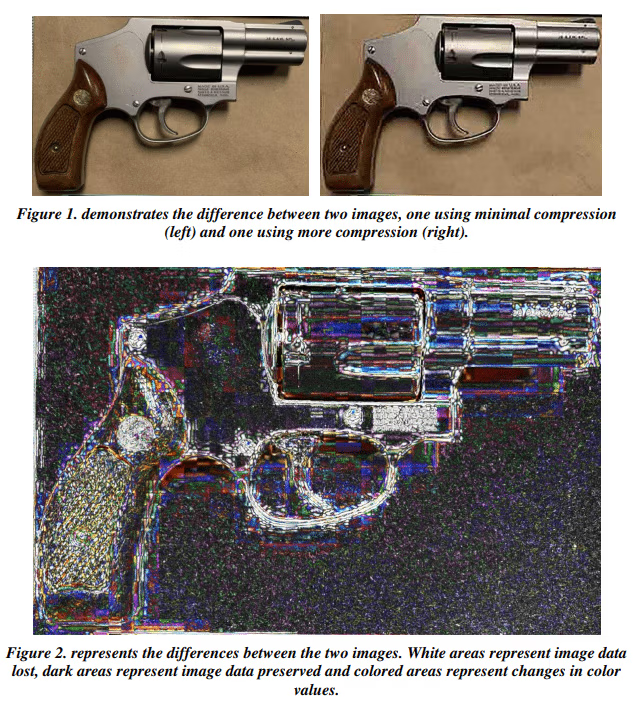
2.3 Compression Artifacts
Compression techniques are employed to reduce the file size of digital images by encoding them in a more efficient manner. These techniques often involve reducing redundant information and eliminating high-frequency components that are less perceptually important.
Some of the common artifacts include, but are not limited to:
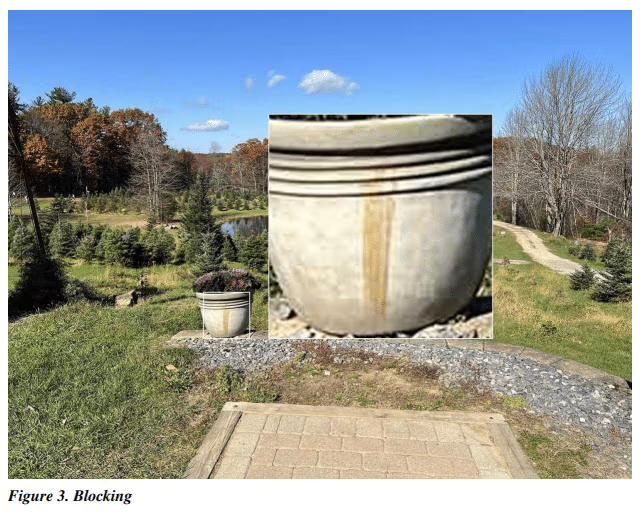
- Blocking
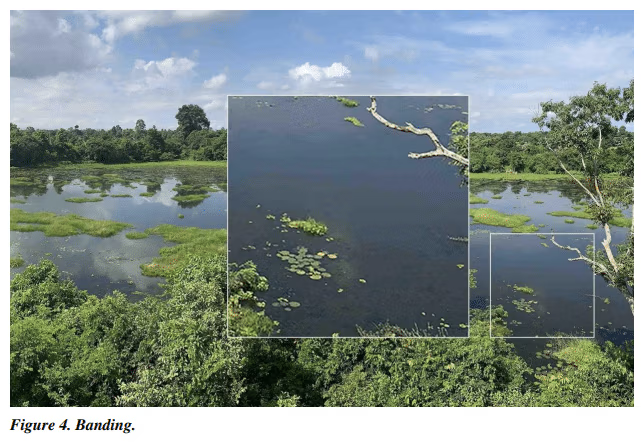
- Banding
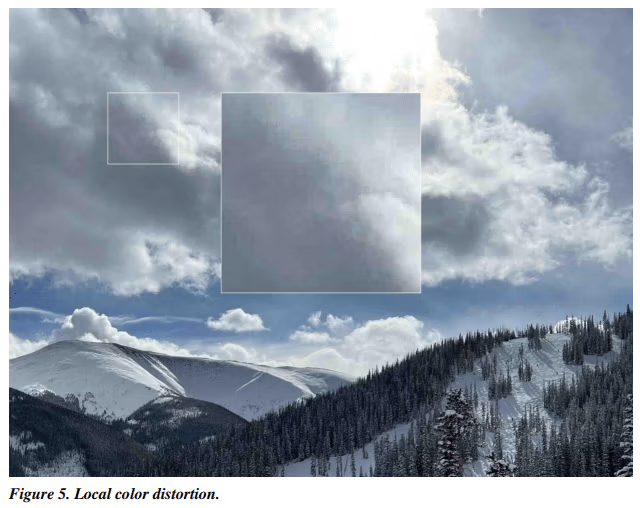
- Local Color Distortion
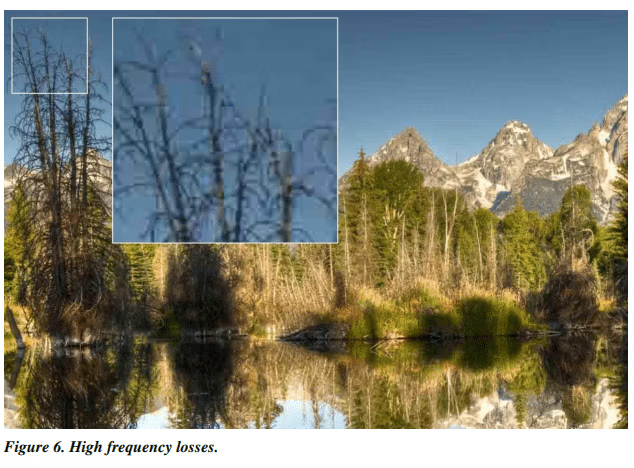
- High Frequency Losses
Blocking – the appearance of pixel blocks throughout an image; these blocks usually coincide with the size of the macroblocks.
Banding – Visible, delineated changes from one color to another in a gradient instead of a smooth transition.
Local color distortion – Appears as a color anomaly in small locations on the image.
High frequency losses – Edges may appear fuzzy and fine detail patterns may be blurred.
2.4 Technical Considerations for Compression
- Compression can be applied at the time of capture or during processing and saving.
- Depending on the degree of compression, as well as the type applied, effects may not be readily apparent to the practitioner.
- Be aware that some images may be compressed for electronic transmission or storage purposes. When receiving compressed files, care should be taken not to compress the data any further. Original images shall be retained and a working copy made of images that require any additional processing. The processed images should be saved in an uncompressed format.
- The decision to use lossy compression, and the degree to which it is applied, should depend on the intended purpose of the images. Applying lossy compression may be acceptable on images used for documentation purposes, such as crime scene or investigative images. It is not recommended to use lossy compression on images that will be subjected to forensic analysis, such as images used for comparative purposes.
- Organizations should test the system from beginning to end, evaluate the end use of an image, in consideration of the storage, workflow, time, and image quality. For more information on data archiving see SWGDE Best Practices for Archiving Digital and Multimedia Evidence.
- Practitioners should have an understanding of the advantages and limitations of compression settings. The default storage settings may not always be optimal for the intended purpose. When saving a lossy-compressed file, any data loss is permanent. Multiple resaves may result in additional compression. Opening, viewing, and closing a file without saving will not result in further compression or degradation.
3. File Formats
A file format is the structure by which data is organized into a file and is the common language that allows data to be exchanged. This often allows for the use of compression to reduce the size of the file and is dependent on the equipment available, workflow, and end use.
Data in an image file commonly contains a header, data block, and footer. The header contains information about the image file including the type of file format and compression algorithm and instructs the computer on how to open the image. The data block is the image content data. If the header information is lost, corrupted or inconsistent with the data block the image may not open. The footer contains information about the file including where the file ends.
Operating systems use file extensions as a convenient way for the computer to anticipate what the file format will be. However, it should be noted that file extensions can be changed and may not represent the actual file format. When this occurs, it may create problems opening the file.
3.1 Common File Formats
There are multiple image file formats, each with its advantages for different applications. These include, but are not limited to:
- Joint Photographic Experts Group (JPEG) is a commonly used lossy compressed image file format. The level of compression can be adjusted, allowing for a trade-off between image size and quality. Jpeg is the most widely used image format and is common to digital cameras, scanners and imaging software.
- High Efficiency Image Format/High Efficiency Image Codec (HEIF/HEIC) is a container format for individual images and image sequences. The standard covers multimedia files that can also include other media streams, such as timed text, audio and video. A HEIF image using High Efficiency Video Coding, HEVC, requires less storage space than the equivalent quality JPEG.
- Tagged Image File Format (TIFF) is a standardized file format that can be compressed (lossless) or uncompressed. TIFF images from digital cameras tend to be large because of limited compression. The TIFF specification allows the incorporation of diverse compression algorithms, including some that are lossy. While the most common algorithms associated with the TIFF format are lossless, one cannot assume this with every image.
- Photoshop Document (PSD) is an image file developed by Adobe systems which has the ability to work and save in layers. It is useful for working within Photoshop but images cannot be used in most other applications. They are not suitable for archiving due their large size and proprietary nature.
- RAW is not a specific file format but a class of formats. Each camera manufacturer has their own version of a RAW file format. A RAW file contains the unprocessed data from the camera’s sensor as well as image metadata. Many digital cameras allow capture in both RAW and JPEG formats simultaneously, allowing for easily viewing and sharing files while retaining the RAW image data.
- Adobe Photoshop’s Digital Negative (DNG) format is a publicly available RAW image format designed by Adobe systems. DNG is based on a TIFF format and mandates use of metadata.
- Portable Network Graphics (PNG) format is a graphics file format that supports lossless data compression.
- Graphics Interchange Format (GIF) is an 8-bit format that has a reduced color set and supports lossless compression.
- Bitmap (BMP) is a format that stores pixels in one or more groups of bits. A BMP can be an uncompressed or losslessly compressed file format.
4. History
| Revision | Issue Date | History |
|---|---|---|
|
Draft |
1/14/2016 |
Original working draft created. Voted for release as
a Draft for Public Comment. |
|
1.0 |
2/8/2016 |
Formatting and tech edit performed for release as a
Draft for Public Comment. |
|
2.0 |
6/9/2016 |
SWGDE voted to publish as an Approved document. |
|
2.0 |
6/23/2016 |
Formatted and posted as an Approved document. |
|
3.0 |
1/13/2022 |
5 Year Document Review with Updates |
|
3.0 |
8/2/2023 |
Formatted for posting after SWGDE membership
voted to release as a Draft for Public Comment. |
|
3.0 |
3/7/2024 |
Editorial changes made based on internal SWGDE
member comments. |
|
3.0 |
3/7/2024 |
Formatted for posting after SWGDE membership
voted to release as an approved Final Publication. |
Version: 3.0 (3/15/2024)